

Google Pixel Buds Review – FUNdamentals

Usability –
Google has recreated a very Apple-esque experience here and this is a good thing. The pairing process is smooth and streamlined, with no awkward button combinations. Simply open the case and, on Pixel devices or other Android devices with the Pixel Buds app installed, a pop-up greets the user offering the ability to pair and name the earphones. The UI then runs the user through the features, gestures and settings with live demos. Should the user want to pair additional devices, simply hold the button on the case and the LED begins to flash making the earbuds available for pairing. Pixel devices have the app baked-in to the Android settings menu and info such as battery life of each bud and the case is accessible from the notification bar too.
Connectivity
Update: Google released the 550 Firmware Update on the 20/08/2020 with a slew of new features detailed below.
As promised Google continued working on the software side and have since released the 550 update which offers connectivity fixes and much more. I am a huge fan of the new features and the ongoing support demonstrated by Google with this.
Install
As always, the automatic update process is a bit aggravating as you are not able to force the update nor is there any feedback on the progress of the download or install. I was able to successfully update by pairing the earphones, viewing the firmware update page that revealed that an update was available. Afterwhich, I used the earbuds for 15 minutes to allow it to download and transfer over to the earphones in the background. Returning them to the case allows the update to install, leave them in there for at least 3 minutes. I’ll also note that you do need to update the Pixel Buds app to be able to use the new features, the apk is available online if that hasn’t been issued to your device yet – install these at your own risk. I had to go to the updates section in the play store where the app was automatically updated though this may also vary by region. Strangely, the Pixel Buds app page didn’t show any update was available until I manually refreshed the available updates page under my apps & games.
New Features
Though there’s still no eQ, there’s a new bass boost toggle, a very handy addition that many listeners will enjoy since lack of bass has been a common complaint for these earphones. Sharing detection is a great addition too, when sharing the earbuds between two listeners, each will be able to set volume independently. Furthermore, you can now check the remaining battery life with Google assistant and track the earphones using “Find My Device” app in addition to ringing them as before. Touch controls can also be turned off entirely and this can be controlled with assistant which is handy during workouts. Attention alerts are a new experimental feature that will lower the volume if the earphones hear important ambient sounds to alert the listener. You can set it to alert you of a baby crying, dog barking or emergency vehicle siren specifically, a handy lifestyle feature. Finally, the earbuds can now transcribe in English, French, German, Italian and Spanish.
Updated Connectivity
In terms of connectivity, I did immediately notice a substantial improvement in range. I was able to traverse over 3 rooms with double brick walls before sound became intermittent matching the better performers I have on hand such as the Sennheiser MTW2. Intermittency between the two earpieces still remained, however, and this was still especially noticeable when in crowded areas. That said, it was hugely reduced to a much more tolerable level if still more prevalent than competitors. I am content with the reliability during daily listening since the cutouts are less frequent and, in particular, re-connection time has been greatly improved. No longer do they get suck in mono for minutes on end, it now reliably takes a split second to reconnect. It is also reassuring that Google were able to improve this to such a large degree from a firmware side which suggests they may be able to further improve upon this in future.
Battery Life

Google quote 24hrs of total listening time with 5hrs of listening time per earbud, so runtimes can be doubled in mono use. They quote just 2.5hrs of talk time likely due to the advance sensor array. In use I was easily able to beat both that 5hr music figure and the 2.5hr talk time rating in stereo, achieving 6hrs of listening time and around 3hrs of talk. The case delivers an additional 4 charges or so as promised, and the LED indicator changes colour to alert the user to top it up. Of note, I do listen at lower volumes but required about 40% volume on the Pixel Buds. They appear to use a logarithmic volume curve that becomes exponentially louder as volume increases and the lower steps are very fine which I personally prefer. A nice touch is the accurate battery percentage on Android to the percent which gives more accurate feedback on remaining runtime.
Baked-in App
I love that the app is integrated into Android which makes toggling settings very accessible. For non-Pixel devices, the Pixel Buds app is easily available on the Play store which will provide a similar experience. The earbuds also receive their own unique icon in the BT menu which makes them easier to identify. First and foremost is the excellent Google Assistant integration. I haven’t always been a fan of smart assistants, but their utility is certainly more appealing as they mature. Here, the implementation is very useful, the earbuds will automatically read out notifications and the user is able to set which are important while silencing others. They respond to the “Hey Google” voice command but the user is able to hold down either earpiece for 2s to manually start the listening process. This can be disabled as well for those that find it intrusive.


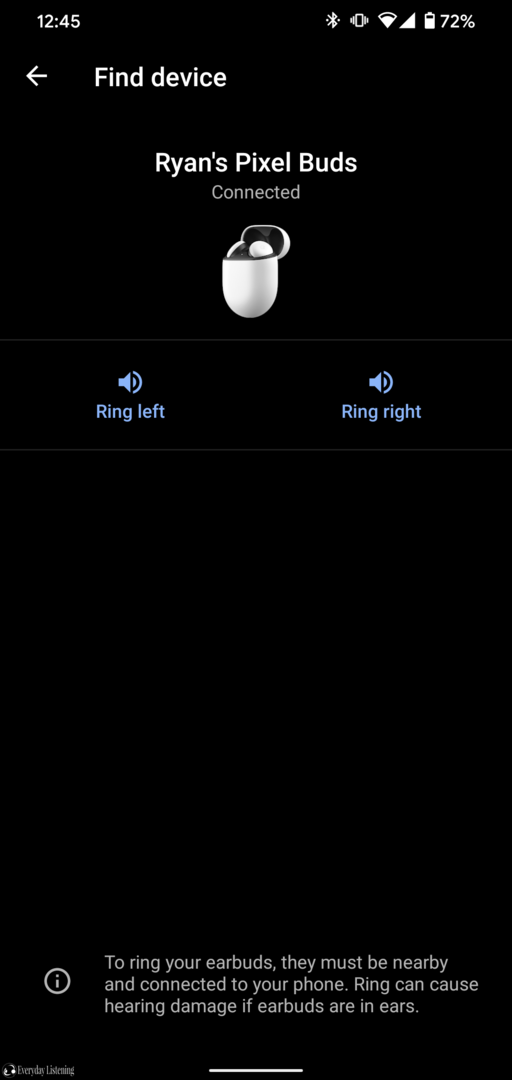
Otherwise, the app offers more lifestyle than audio settings but are very handy features that other manufacturers would benefit from adopting For one, the find device features is superb, playing an increasingly loud chime through the users decided earpiece until they are located – handy to know if one earpiece has fallen under a pillow, etc. You can also view the touch control menu though you aren’t able to change the gestures at this time. Adaptive sound alters the volume automatically based on the ambient noise level and I found it to provide acceptable results, but it is mostly redundant. As of the 550 update there’s also a bass boost toggle. In-ear detection uses the IR sensors to pause music when one is removed from the ear. I noticed a second delay but reliable operation of this function. The last menu provides support and firmware updates, in typical Google fashion, fluidity is key so these usually are installed automatically and I found the process smooth and unobtrusive to use.
Real-time translation
Google made big claims with the real-time translation and it was something I was personally very excited for when announced. However, in actuality, the feature feels ill-conceived at present, adding little to the experience. In essence, it operates through the translate app, which on its own does a terrific job. One speaker is able to use the phone to input speech and listen while the other uses the earbuds. However, the feature doesn’t truly translate in real-time, the speaker must release the talk button to finish speaking before the app translates into the desired language and relays that to the listener verbally. So in use, this feature actually adds extra steps over the vanilla translate app. As of firmware version 550 the earbuds can also transcribe to your phone in foreign languages.
Call Quality
Thankfully, the call quality is very good so though there are some additional features that aren’t fully realised here, the Pixel Buds at least nail the fundamentals. Recipients noted that my voice sounded full, immediate and well-defined despite a lack of stem or other apparatus to bring the mic closer to the mouth. As such, the Pixel Buds retain a sleek form factor while also reaping the benefit of clear call quality. Ambient noise cancellation is excellent and some of the best I’ve experienced, I would put them on par with the Freebuds 3 and Airpods Pros in terms of vocal intelligibility outdoors or in louder environments.
Touch Controls

These are the best touch controls I’ve used hands down. The entire white surface acts as a capacitive sensor meaning that not only do you get tap and hold gestures, you’re also able to swipe. In turn, the earbuds are also able to better sense accidental presses, for instance, lying down on my side I didn’t trigger any sudden volume changes if the sides glanced my outer ear. This makes them a lot more accurate than most solutions. The swipes worked very well and you are able to palm the faceplate like the MTW2 which is handy when running where it’s difficult to accurately tap. The touch controls can be toggled completely off in the app and using the assistant as of firmware version 550 as well.

Ryan Soo
Avid writer, passionate photographer and sleep-deprived medical student, Ryan has an ongoing desire to bring quality products to the regular reader.
 Everyday Listening